Configuration Settings:
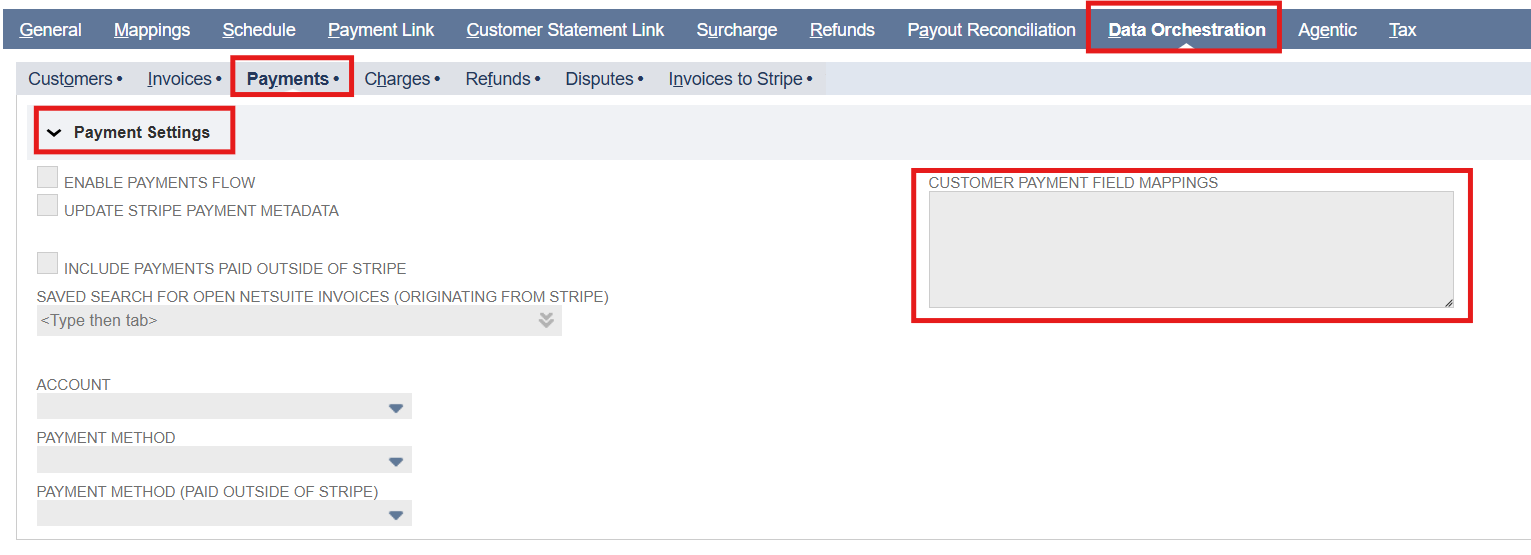
All payment settings are located under the Payments subtab within the Data Orchestration tab. Inside this subtab, the Payment Settings field group contains all configuration fields required for managing the Payments flow.
Note: Click any field label in the Payment Settings field groups to see a description of its purpose and usage.
Field Descriptions
Enable Payments Flow: Check/mark to enable importing Stripe payments into NetSuite. Uncheck to stop all payment imports.
Update Stripe Payment Metadata: Check/mark to automatically write the NetSuite Customer Payment record's Internal ID back to the corresponding Stripe payment intent after it is created.
Include Payments Paid Outside of Stripe: Check/mark to allow importing payments that were paid outside of Stripe. When enabled, a Customer Payment record is created using the invoice's total amount with no Stripe payment intent ID. When unchecked, such payments are skipped.
Saved Search for Open NetSuite Invoices (Originating from Stripe): A saved search in NetSuite used to identify open invoice records that are eligible for payment import from Stripe.
Account: Select the NetSuite account where Stripe payments will be recorded. All imported payments are posted to this account.
Payment Method: Select the payment method in NetSuite for recording Stripe payments.
Payment Method (Paid Outside of Stripe): Select the payment method in NetSuite for recording Stripe payments that are paid outside of Stripe.
Note: To use condition-based mapping, leave the Payment Account, Payment Method, or Payment Method (Paid Outside of Stripe) fields empty and use static or dynamic mapping. Filling in these fields sets a global default that overrides any conditional logic in the Customer Payment Field Mappings.
Customer Payment Field Mappings: Controls how Stripe Payment (Payment Intent) fields are mapped to NetSuite Customer Payment fields and allows inclusion of related invoice and customer data from the saved search.
Note: Fields from the Stripe payment intent object can be used. Payment data is organized as an array within each payment object, with associated invoice and customer IDs from saved search available via the stripeData object (for example, stripeData.stripeInvoiceId, stripeData.stripeCustomerId).
Sample Field Mappings:
Sample Customer Payment Field Mappings:
{
  "fields": [
    {
      "generate": "subsidiary",
      "hardCodedValue": "1"
    },
    {
      "generate": "payment",
      "handlebars": "{{toFixed (divide amount 100) 2}}"
    },
    {
      "generate": "paymentmethod",
      "hardCodedValue": "10"
    },
    {
      "generate": "account",
      "hardCodedValue": "2"
    },
    {
      "generate": "custbody_pp_s2ns_payment_intent_id",
      "extract": "id",
      "fieldType": "internalid"
    },
    {
      "generate": "custbody_nm_stripe_dcharge_id",
      "extract": "latest_charge.id"
    },
    {
      "generate": "custbody_pp_stripe_bal_txn_id",
      "extract": "latest_charge.balance_transaction"
    }
  ],
  "sublist": {
    "apply": [
      {
        "generate": "apply",
        "hardCodedValue": "T"
      },
      {
        "generate": "doc",
        "extract": "nsData.nsInvoiceId"
      }
    ]
  }
}